Employment Bank Status Check 2026: Check Enrolment & Yuvashree Status With Jobseeker ID (Easy Steps)
Last checked: 3 November 2026. If you registered on West Bengal’s Employment Bank, you may want to know whether your enrolment has been validated, or whether you are on the Yuvashree list. An Employment Bank status check answers these questions in a few minutes with your Jobseeker ID.
Many job seekers register and then never check again, only to find later that their profile was never validated. This guide explains how to do an Employment Bank status check, what each result means, how to see the Yuvashree waiting list, what to do if your temporary enrolment was never validated and where to get help.
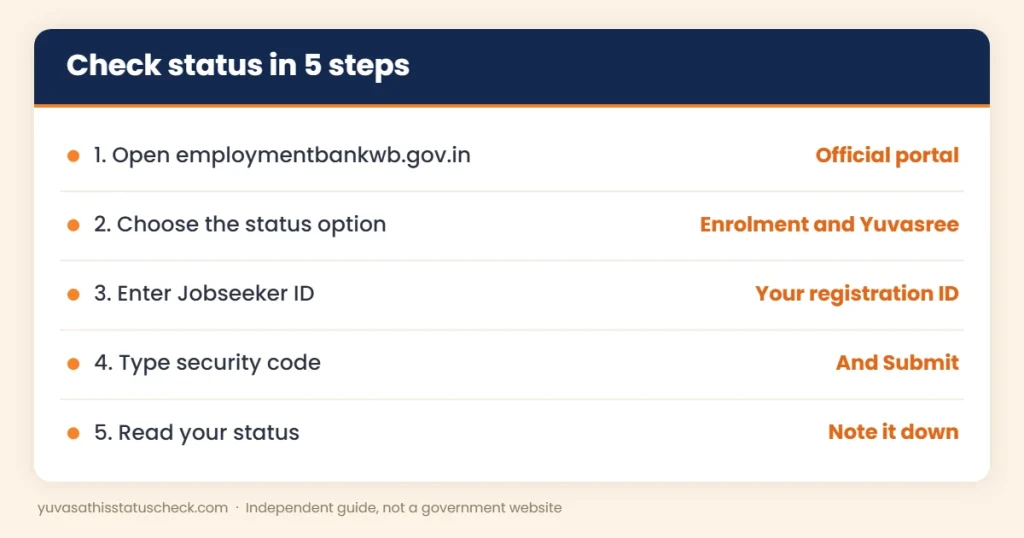
Quick answer: For an Employment Bank status check, open employmentbankwb.gov.in, choose the option to view status for enrolment and Yuvasree, enter your Jobseeker ID and the security code, and click Submit. Separate options on the portal show the Yuvasree waiting list and your position in the final waiting list.
What is an Employment Bank status check?
The Employment Bank is the Government of West Bengal’s online portal for job seekers, run with the Labour Department and the state’s Employment Exchanges. When you enrol, your record goes through stages: temporary enrolment, validation at an Employment Exchange and then an active profile.
Doing an Employment Bank status check regularly helps you avoid surprises. It lets you see:
- Whether your enrolment has been validated.
- Your status under the Yuvashree allowance, if you applied for it.
- Whether your name appears in the Yuvashree waiting list or final waiting list.
If you have not registered yet, start with our Employment Bank registration guide.
Employment Bank status check at a glance
| Point | Details |
|---|---|
| Portal | employmentbankwb.gov.in |
| What you need | Jobseeker ID and the security code shown on screen |
| Options | Enrolment and Yuvasree status, waiting list, final waiting list |
| Cost | Free |
| Helpline (as listed) | 033-2237-6300, Monday to Friday, office hours |
How to do an Employment Bank status check: step by step
- Open the official portal, employmentbankwb.gov.in.
- On the home page, look for the option to view status for enrolment and Yuvasree.
- Enter your Jobseeker ID.
- Type the security code shown on the screen.
- Click Submit.
- Read your status and take a screenshot.
What is the Jobseeker ID?
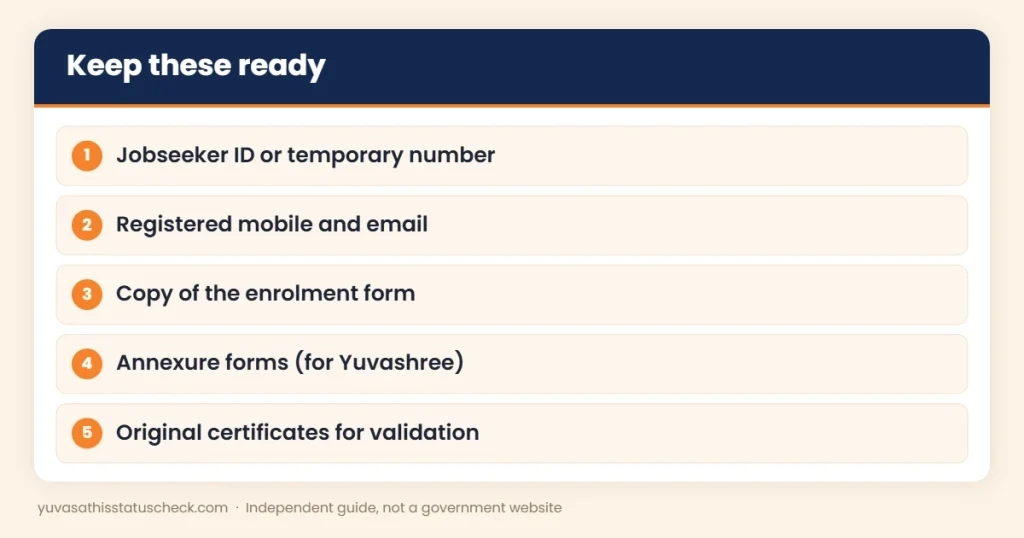
The Jobseeker ID is the registration number linked to your Employment Bank profile. You get a temporary enrolment number when you first submit the online form. After your documents are checked at an Employment Exchange, your profile is validated and you receive login details. Keep both numbers safe, because the Employment Bank status check needs your ID. Write them in a notebook as well as on your phone, since SMS and emails can get deleted over time.
Employment Bank status check on a mobile phone
You can do an Employment Bank status check on any smartphone. Use an updated browser, turn the phone sideways if the page is cramped, and zoom in to read the security code clearly. If the code is hard to read, refresh it to get a new one. Take a screenshot of the result so you have proof of your status.
Status check vs full login
An Employment Bank status check with your Jobseeker ID only shows your current stage. A full login, with the username and password you get after validation, lets you update your profile, add qualifications and look for jobs. If you have login details, use them regularly; if not, the status check tells you whether you still need to visit the Employment Exchange.
From enrolment to active profile: timeline
| Stage | What happens | Typical time |
|---|---|---|
| Online enrolment | You submit the form and get a temporary number | Same day |
| Exchange visit | Your original certificates are checked | Within 30 days |
| Validation | Your profile is approved | Usually soon after the visit |
| Login details | Username and password sent by SMS or email | After validation |
| Active profile | You can update details and see vacancies | Ongoing |
A quick Employment Bank status check at each stage tells you whether you need to do anything.
How to check the Yuvashree waiting list
The portal has separate options for the Yuvashree allowance:
- New waiting list: choose the option to view the Yuvasree new waiting list, open or download the list and search for your name.
- Final waiting list status: choose the option to view your status in the final waiting list of Yuvasree and enter your details. Guides say this shows your serial number.
Lists are usually released as files, so you may need to search inside the file for your name or ID. Yuvashree was the older allowance linked to the Employment Bank. For the full background, read our Yuvashree Prakalpa guide.
What your status may mean
| Status (in general terms) | What it means | What to do |
|---|---|---|
| Temporary / not validated | You enrolled online but have not been validated | Visit your Employment Exchange with original certificates |
| Validated / active | Your profile is checked and active | Keep your profile updated |
| Provisionally identified (Yuvashree) | You were short-listed for the allowance | Submit the required forms on time |
| In waiting list (Yuvashree) | You are on the list but not yet selected | Check the list regularly |
| No record found | Wrong ID or typing error | Recheck the ID; contact the exchange |
The exact words on the portal may differ. If anything is unclear, ask at your Employment Exchange. Take a screenshot of the status page with you, so the staff can see exactly what you saw and guide you faster.
Employment Bank status check for Yuvashree applicants
If you applied for the Yuvashree allowance, your Employment Bank status check matters even more. Being provisionally identified meant you were short-listed, but you still had to submit the required annexures and get them validated at the Employment Exchange. A waiting list position meant you were eligible but not yet selected. Do an Employment Bank status check after every step, such as submitting forms or visiting the exchange, so you know your record has been updated.
Yuvashree forms: Annexure 1, 2 and 3
Guides on the Yuvashree process describe three forms that provisionally identified job seekers had to submit:
- Annexure 1: the application for unemployment assistance, which can be submitted online.
- Annexure 2: an unemployment certificate from a Group A officer.
- Annexure 3: a self-declaration by the beneficiary.
Printed copies of these forms were to be taken to the Employment Exchange for validation. Missing any one of them could delay or stop the allowance, so keep copies of all three with your receipts. For help with the certificate, see our unemployment certificate West Bengal guide.
Temporary enrolment not validated? Here is what to do
When you register, you get a temporary enrolment number and must visit an Employment Exchange within 30 days with your original certificates. If you missed this:
- Do an Employment Bank status check to confirm your record is still temporary.
- Visit your nearest Employment Exchange with your temporary number and original documents.
- Ask whether your old enrolment can still be validated.
- If it has lapsed, register again and complete the visit on time.
How often should you check?
There is no fixed rule. A good habit is to do an Employment Bank status check:
- A few days after you enrol online.
- After your visit to the Employment Exchange.
- After submitting any Yuvashree annexures.
- Every few months, to confirm your profile is still active.
3 real-life examples
Amit, 26, Howrah: He enrolled online and forgot about the Employment Exchange visit. Months later, his Employment Bank status check still showed a temporary record. He visited the exchange, learned the 30-day window had passed and registered again, this time completing the visit in the first week.
Rubina, 29, Uttar Dinajpur: She was on the Yuvashree waiting list. She checked her final waiting list status on the portal and saw her serial number, which helped her follow up at the exchange.
Sourav, 23, Kolkata: His status check showed “invalid ID” because he was typing his temporary number instead of the validated ID. Using the correct number from his SMS fixed it.
Mistakes to avoid
- Typing the wrong number, such as the temporary number instead of the Jobseeker ID.
- Missing the 30-day Employment Exchange visit.
- Not updating your mobile number, and missing SMS alerts.
- Paying agents for an Employment Bank status check, which is free.
- Trusting look-alike websites; use only employmentbankwb.gov.in.
Common problems and fixes
| Problem | Likely reason | Fix |
|---|---|---|
| “Invalid ID” | Typing mistake or wrong number | Check every digit; use the number from your SMS or email |
| Security code error | Code typed wrongly | Refresh and type the new code carefully |
| Page not loading | Server busy | Try again at a quieter time |
| Status not updated | Validation not yet entered | Ask at your Employment Exchange |
| Lost Jobseeker ID | SMS or email deleted | Search old messages; ask the exchange with your Aadhaar |
Lost your login details?
If you completed validation but lost your username or password, first look for the SMS or email sent after validation. Then try the forgot password option on the portal’s login page, which usually works with your registered mobile number or email. If that fails, visit your Employment Exchange with your Aadhaar and Jobseeker ID. You can still do an Employment Bank status check with your ID while you recover your login.
Why your status matters
A validated, active profile is more useful than a temporary one:
- Employers searching the database see active profiles.
- Some schemes have used Employment Bank registration as a condition.
- Offices may accept a validated profile as supporting proof that you are looking for work.
- Your record of qualifications is checked once, which saves time later.
So an Employment Bank status check is not just a formality; it tells you whether your profile is actually working for you.
Different job seekers, same steps
- Fresh graduates: add your final marksheet as soon as results come, then check your status after the exchange updates it.
- ITI and diploma holders: list your trade clearly, because employers often search by trade.
- Women job seekers: the 2026-27 budget promised 33 percent reservation for women in government recruitment, so keep your profile ready for notices.
- Experienced workers: add your work history with dates.
The Employment Bank status check works the same way for everyone.
Employment Bank status check and other schemes
Your Employment Bank record can matter for other schemes too:
- The older Karma Sathi loan scheme required Employment Bank registration; see our Karma Sathi Prakalpa guide.
- Some offices accept a validated Employment Bank profile as supporting proof that you are looking for work.
- The new Yuva Shakti allowance (₹3,000 for graduates, ₹2,000 for others) has not yet said whether Employment Bank registration is needed; see our Yuva Shakti scheme guide.
- For a comparison of all unemployment allowances, read our bekar bhata guide.
Tips for your Employment Exchange visit
- Carry your temporary number or Jobseeker ID and a printout of your enrolment.
- Take original certificates and photocopies of Madhyamik, HS, degree and any skill certificates.
- Take your Aadhaar card and a passport-size photo.
- Go early on a working day and be ready to wait.
- Ask the officer to confirm that your record is validated before you leave, and do an Employment Bank status check the next day.
What to do after a successful check
Once your Employment Bank status check shows an active or validated profile:
- Log in with your username and password.
- Check that every detail is correct.
- Add new skills and qualifications.
- Look for vacancies regularly.
- Keep your login details safe.
Using a cyber cafe or CSC
If you do not have a phone or computer, you can do the check at a cyber cafe or Common Service Centre. Watch the screen to make sure the operator is on the official portal, type your Jobseeker ID yourself if possible, and ask for a printout of the result. Pay only the normal service or printing charge.
When the portal is down
Government portals sometimes go slow, especially when a list is released or a new scheme is announced. If the page does not open:
- Try again early in the morning or late at night.
- Clear your browser cache or use another browser.
- Wait a day and try again rather than refreshing many times.
- If it stays down for several days, ask your Employment Exchange to check your record.
Where to get help
- Your Employment Exchange: the office that validates your enrolment can see your record.
- Helpline: 033-2237-6300 (as listed), Monday to Friday during office hours.
- Portal: employmentbankwb.gov.in for status and notices.
Take your Aadhaar, Jobseeker ID or temporary number and certificates when you visit. If you call the helpline, keep your ID ready and note the name of the person you spoke to and the date.
Keep your profile useful
An Employment Bank status check is only the start. To get real value from your profile:
- Add every new qualification and skill.
- Update your mobile number and email when they change.
- Check the portal for vacancies that match your profile.
- Keep a folder of scanned certificates for quick uploads.
The 2026-27 budget promised 1 lakh government vacancies; see our West Bengal budget 2026 summary for details.
Safety tips
- Use only the official address, employmentbankwb.gov.in.
- Never share your password or OTP with anyone.
- Do not pay agents who promise jobs through the Employment Bank.
- Report job scams on 1930 or at cybercrime.gov.in.
Key points to remember
- You need your Jobseeker ID and the security code for the status check.
- A temporary enrolment must be validated at an Employment Exchange within 30 days.
- The portal has separate options for Yuvashree waiting lists.
- The service is free.
- Keep your profile updated after validation.
Frequently asked questions
How do I do an Employment Bank status check?
Open employmentbankwb.gov.in, choose the option to view status for enrolment and Yuvasree, enter your Jobseeker ID and the security code, and click Submit.
What do I need for the status check?
Your Jobseeker ID and the security code shown on the screen.
How can I check the Yuvashree waiting list?
Use the portal’s options for the Yuvasree new waiting list and for your status in the final waiting list.
My enrolment is still temporary. What should I do?
Visit your nearest Employment Exchange with your temporary number and original certificates. If the 30-day window has passed, you may need to register again.
Is the Employment Bank status check free?
Yes. The service is free.
I lost my Jobseeker ID. How can I find it?
Search your old SMS and email, or visit your Employment Exchange with your Aadhaar and other details.
Is there a helpline?
Guides list 033-2237-6300, available Monday to Friday during office hours.
Do I need Employment Bank registration for Yuva Shakti?
The Yuva Shakti rules have not been published yet, so this is not confirmed.
Sources we checked
- Employment Bank, Government of West Bengal: official portal.
- Sarkari Yojana: Employment Bank Yuvasree status: status options, Jobseeker ID and security code, waiting lists, annexures, helpline.
- WBXPRESS: Employment Bank: temporary enrolment and 30-day validation.
- myScheme: Yuvasree: Yuvashree and the Employment Bank.
Disclaimer: yuvasathisstatuscheck.com is an independent information website. It is not connected with the Government of West Bengal. Portal options can change, so always follow what the official site shows.
One Comment