Yuva Shakti DBT Link 2026: How to Check & Link Aadhaar With Your Bank (NPCI Seeding Made Easy)
Last checked: 29 October 2026. When the Yuva Shakti allowance starts, the money is expected to reach applicants by Direct Benefit Transfer (DBT). DBT works only if your Aadhaar is correctly linked with your bank account in the national payment system. This is what most people mean by the “Yuva Shakti DBT link”.
If the link is missing, inactive or pointing to an old account, your ₹3,000 or ₹2,000 can fail or land in the wrong account. This guide shows how to check your Yuva Shakti DBT link status in a few minutes, how to fix it and which mistakes to avoid.
Quick answer: To check your Yuva Shakti DBT link, log in to the myAadhaar portal with an OTP and open “Bank Seeding Status”. If your bank name shows as active, you are ready. If not, ask your bank to seed Aadhaar for DBT, or use the NPCI BASE service.
What does Yuva Shakti DBT link mean?
The Yuva Shakti DBT link is not a special form or a separate website. It simply means your Aadhaar number is “seeded” or “mapped” to one bank account in the records of NPCI (National Payments Corporation of India).
Government schemes that pay by DBT send money using your Aadhaar number. NPCI looks up which bank account is mapped to that Aadhaar and sends the money there. This system is called the Aadhaar Payments Bridge.
So when people search for the Yuva Shakti DBT link, they want to know two things: is my Aadhaar mapped, and is it mapped to the right account?
Aadhaar linking vs DBT seeding: not the same thing
Many people think that giving Aadhaar to the bank for KYC is enough. It is not always enough.
- KYC linking means the bank has your Aadhaar in its records to confirm your identity.
- DBT seeding means the bank has also told NPCI to map your Aadhaar to that account for receiving government payments.
An account can have Aadhaar in KYC but still not be seeded for DBT. That is why checking your Yuva Shakti DBT link status matters.
Why the Yuva Shakti DBT link matters
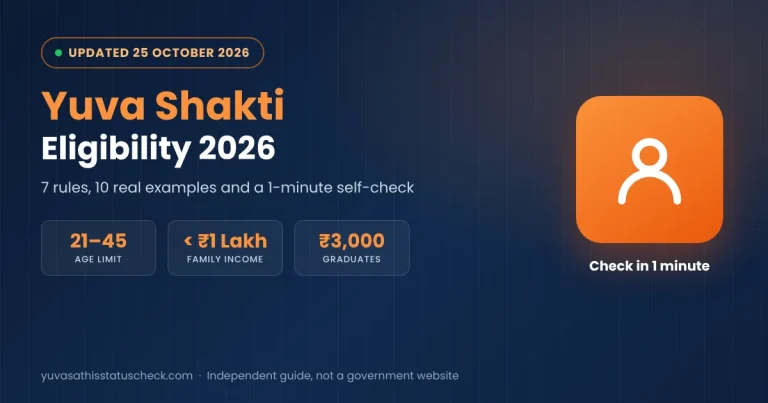
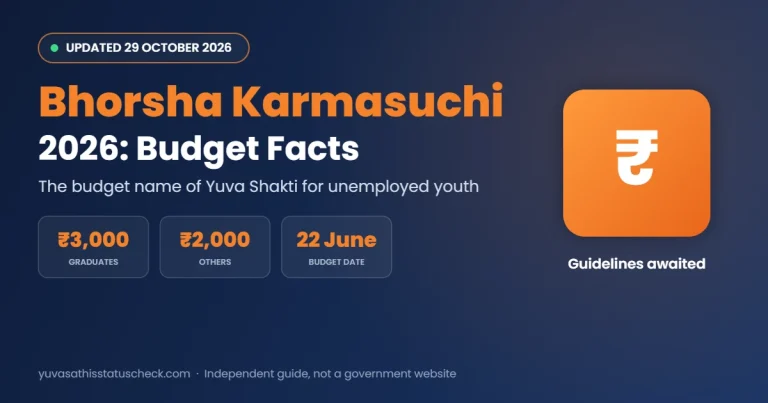
The Yuva Shakti scheme, called Bhorsha Karmasuchi in the budget, is expected to pay ₹3,000 a month to graduates and ₹2,000 to other eligible youth by DBT. For the full scheme details, read our Yuva Shakti scheme guide.
A correct Yuva Shakti DBT link helps you in three ways:
- Payment reaches you. Money goes to the account mapped with your Aadhaar.
- No delays. Failed payments usually need correction and a fresh transfer, which takes time.
- No wrong account. If an old or closed account is mapped, the money may bounce or go somewhere you do not expect.
The form has not opened yet, so now is the best time to fix your Yuva Shakti DBT link. Our Yuva Shakti payment date page tracks when money may start.
Who should check first?
Some people are more likely to face a problem. Check your Yuva Shakti DBT link status today if any of these apply to you:
- You opened more than one bank account over the years.
- You recently changed banks or closed an account.
- You have not used your account for a long time.
- Your Aadhaar is linked to a family member’s mobile number.
- You applied for Yuva Sathi but never received a payment.
How to check Yuva Shakti DBT link status
There are three common ways to check. You need your Aadhaar number and the mobile number registered with Aadhaar, because an OTP is sent to it.
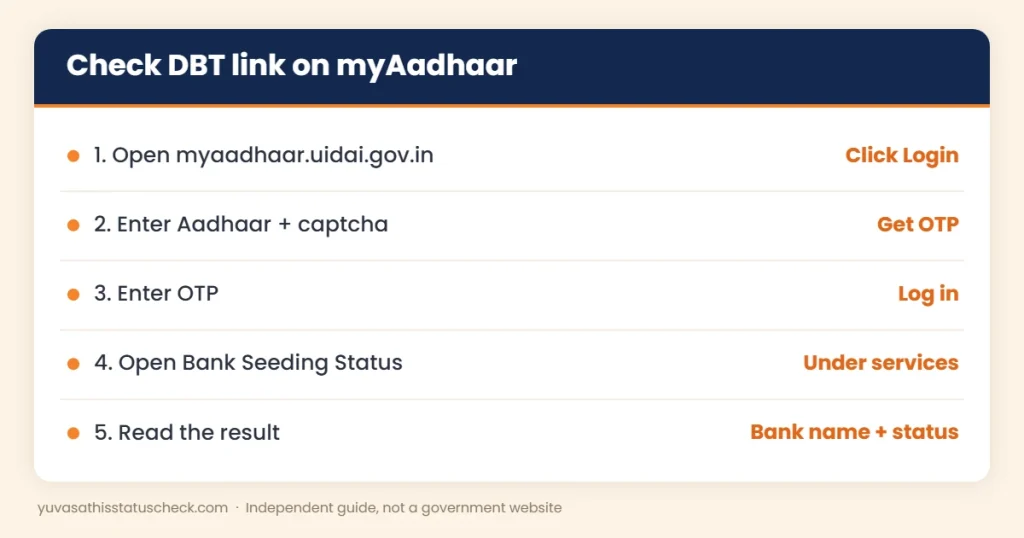
Method 1: myAadhaar portal (fastest)
- Open the myAadhaar portal and click Login.
- Enter your 12-digit Aadhaar number and the captcha, then request an OTP.
- Enter the OTP sent to your Aadhaar-linked mobile and log in.
- Open Bank Seeding Status from the services list.
- Read the result. It shows the bank name, the seeding status (active or inactive) and the date it was last updated.
Method 2: NPCI website
- Go to npci.org.in and open the Consumer section.
- Choose Bharat Aadhaar Seeding Enabler (BASE).
- Select Get Aadhaar Mapped Status.
- Enter your Aadhaar number, the captcha and the OTP.
- The page shows which bank your Aadhaar is mapped to.
The same BASE section also has options to request Aadhaar seeding, check the status of your request and see your mapping history.
Method 3: at your bank branch
Visit your home branch with your passbook and Aadhaar card. Ask the staff to confirm whether your account is “Aadhaar seeded for DBT” or “NPCI mapped”. Some banks also show this in net banking or the mobile app.
Some guides also mention a USSD code (*99*99*1#) for checking the Yuva Shakti DBT link status by phone. This service has often been reported as unavailable, so use the myAadhaar or NPCI method first.
What your Yuva Shakti DBT link result means
| What you see | What it means | What to do |
|---|---|---|
| Your bank name, status Active | Your Yuva Shakti DBT link is fine | Nothing; keep the account active |
| Your bank name, status Inactive | Seeding has been disabled | Visit the bank and request re-seeding |
| A different or old bank | DBT money will go to that bank | Seed your current account, or use the old one |
| No bank shown | Aadhaar is not mapped anywhere | Request seeding at your bank or via BASE |
| “Unable to fetch status” | Temporary server problem | Try again later; check your Aadhaar number |
Note that the result only shows the bank name, not the account number. If you have more than one account in the same bank, ask the branch which account is mapped.
How to do the Yuva Shakti DBT link (Aadhaar seeding)
If your status is missing, inactive or wrong, you can fix your Yuva Shakti DBT link in one of these ways.
Option A: at your bank branch
- Visit the branch where you hold the account you want to use.
- Ask for the Aadhaar seeding consent form for DBT (names differ by bank).
- Fill in your account number and Aadhaar number, and sign it.
- Attach a self-attested copy of your Aadhaar card.
- Submit it and keep the acknowledgement.
The bank sends the request to NPCI. It usually takes a few working days to show up.
Option B: NPCI BASE portal
- Open npci.org.in, go to Consumer, then Bharat Aadhaar Seeding Enabler (BASE).
- Choose Request for Aadhaar Seeding.
- Enter your Aadhaar number and select your bank.
- Choose whether you want fresh seeding or a change of bank.
- You are sent to your bank’s page to confirm with your account details and an OTP.
- Use Check Your Service Status after a few days.
Not every bank supports online seeding through BASE. If your bank is not listed, go to the branch.
Option C: net banking or mobile app
Many banks have an “Aadhaar seeding” or “Link Aadhaar” option in net banking. Some only update KYC and not DBT seeding, so check your status on myAadhaar afterwards.
Option D: India Post Payments Bank
If you do not have a bank account at all, an India Post Payments Bank account opened with Aadhaar at your local post office or through the postman is a simple option. Ask them to enable it for DBT, then confirm your Yuva Shakti DBT link status on myAadhaar.
What is Bharat Aadhaar Seeding Enabler (BASE)?
BASE is an online service run by NPCI. It lets you request Aadhaar seeding with your bank without filling a paper form, as long as your bank supports it. It has four options:
- Request for Aadhaar Seeding: start fresh seeding or change the bank your Aadhaar is mapped to.
- Check Your Service Status: see whether your request has been processed.
- Get Aadhaar Mapped Status: see which bank your Aadhaar is mapped to right now.
- Get Aadhaar Mapping History: see older mappings, which helps if money went to an unexpected bank.
BASE is useful if you cannot visit the branch easily. But it still depends on your bank approving the request, so check the result afterwards.
How long does seeding take?
In most cases, seeding shows up within a few working days after the bank processes it. Sometimes it takes longer, especially when many people apply at once before a scheme opens.
That is why you should not wait for the Yuva Shakti form. Do your Yuva Shakti DBT link check now, so there is enough time to fix any problem.
How to update the mobile number linked to Aadhaar
Every online check needs an OTP on the mobile number registered with Aadhaar. If that number is lost, switched off or belongs to someone else, you cannot check anything online.
To update it, visit an Aadhaar enrolment or update centre, such as one at a bank branch, post office or Aadhaar Seva Kendra. Take your Aadhaar card and the new mobile number. The update is done with your fingerprint or iris scan, and a small fee is charged. After the update, wait for the confirmation SMS before trying the myAadhaar check again.
Also update the same mobile number with your bank, so that you get an SMS when government money arrives.
3 real-life examples
Example 1: Mita, 26, graduate. Mita checked myAadhaar and saw her Aadhaar mapped to an old bank account she opened in school. She now uses a different bank. She submitted the seeding form at her new bank, and the status changed after a few days.
Example 2: Rahul, 31, Madhyamik pass. Rahul’s status showed “Inactive”. His account had become dormant because he had not used it for two years. He made a small deposit, updated KYC and asked the branch to seed Aadhaar again.
Example 3: Shabnam, 23, HS pass. Shabnam could not log in because her Aadhaar was linked to her father’s old number. She updated her mobile at an Aadhaar centre, then checked her status and found it active.
In each case, the fix was simple, but it took time. That is the main reason to check now and not after the form opens.
Common DBT problems and how to fix them
| Problem | Why it happens | How to fix it |
|---|---|---|
| Aadhaar not seeded | Bank never sent the DBT request | Submit the seeding form at the branch |
| Seeded to an old account | You changed banks | Request a change of bank through BASE or the new bank |
| Account inactive or dormant | No transactions for a long time | Do a small deposit or withdrawal; update KYC |
| Account closed | Old account was shut | Seed a new active account |
| Name mismatch | Different spellings in Aadhaar and bank | Correct the name at the bank or in Aadhaar |
| Joint account | You are not the first holder | Use a single-name account in your own name |
| No OTP | Mobile not linked to Aadhaar | Update your mobile at an Aadhaar centre |
Which bank account is best for Yuva Shakti?
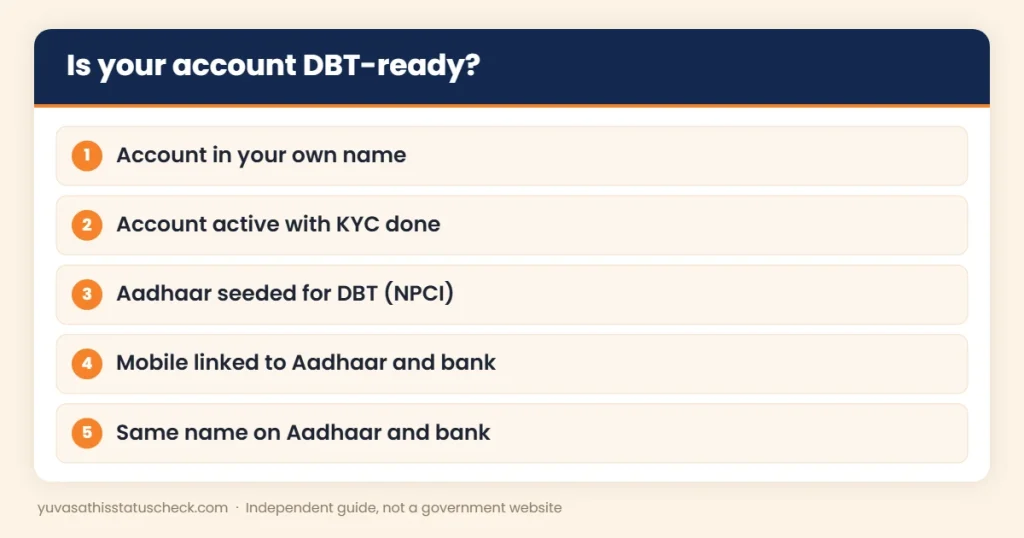
Choose an account that is easy to keep active and that you control yourself. A good Yuva Shakti account should be:
- A savings account in your own name, not a joint account.
- With a bank branch close to your home, so you can visit if needed.
- KYC complete and Aadhaar seeded for DBT.
- Linked with your own mobile number for SMS alerts.
- Used at least once in a while, so it does not become dormant.
A zero-balance basic savings account or a Jan Dhan account can be used, as long as it is active and seeded. Use the same account details in the form that your Yuva Shakti DBT link points to.
For Yuva Sathi applicants: check your DBT link too
If you applied for Yuva Sathi and never received money, a broken DBT link could be one of the reasons, apart from the payments being on hold after May 2026. Check your status the same way. Our Yuva Sathi payment status page explains how to check the old payment, and our Yuva Sathi payment date guide explains what happened to the instalments.
If you were a Yuva Sathi applicant, also read our Yuva Shakti vs Yuva Sathi comparison, because the new scheme may need a fresh application.
Yuva Shakti DBT link and the application form
When the Yuva Shakti form opens, it will most likely ask for your bank details, such as account number, IFSC and a copy of the passbook. Keep these points in mind:
- Enter the details of the same account that your Yuva Shakti DBT link shows on myAadhaar.
- Copy the IFSC carefully from your passbook or cheque book.
- Upload a clear scan of the passbook’s first page showing your name, account number and IFSC.
- Make sure the name on the passbook matches your Aadhaar and the form.
For more on the form, see our Yuva Shakti form fill up guide and the Yuva Shakti documents required list. The budget background is in our Bhorsha Karmasuchi explainer.
Stay safe: Yuva Shakti DBT link scams
Fraudsters use words like “DBT link” and “NPCI update” to trick people. Follow these rules:
- No genuine bank or government office will ask for your ATM PIN, UPI PIN or full card number.
- Do not share an OTP with anyone who calls you about a Yuva Shakti DBT link.
- Do not click links in SMS or WhatsApp messages that promise to “activate DBT”.
- Use only official sites: myaadhaar.uidai.gov.in and npci.org.in.
- Report fraud at cybercrime.gov.in or call 1930.
Quick checklist before the form opens
- Check your Yuva Shakti DBT link status on myAadhaar.
- Make sure the bank shown is the account you want to use.
- Confirm the account is active and KYC is complete.
- Link your mobile number with both Aadhaar and the bank.
- Keep a clear scan of the passbook’s first page.
Frequently asked questions
What is the Yuva Shakti DBT link?
It means your Aadhaar is seeded or mapped to a bank account in NPCI records, so government payments sent by DBT can reach that account.
How do I check my Yuva Shakti DBT link status?
Log in to the myAadhaar portal with your Aadhaar number and OTP, then open Bank Seeding Status. You can also use the NPCI BASE service on npci.org.in.
Is bank KYC with Aadhaar the same as DBT seeding?
No. KYC linking confirms your identity. DBT seeding maps your Aadhaar to the account for government payments. You may need both.
My Aadhaar is seeded to an old bank. What should I do?
Either keep that account active and use it, or request seeding of your new account. The latest seeding usually replaces the old mapping.
How long does Aadhaar seeding take?
It usually shows within a few working days after the bank processes the request, but it can take longer.
Do I need to pay for the Yuva Shakti DBT link?
No. Aadhaar seeding at your bank or through NPCI BASE is free.
Can I use a joint account?
It is safer to use a single-name savings account in your own name. Joint accounts where you are not the first holder can cause problems.
Has the Yuva Shakti form opened?
Not yet. As of 29 October 2026, no official form or notification has been released.
Sources we checked
- myAadhaar portal (UIDAI): Bank Seeding Status service.
- NPCI: Consumer section, Bharat Aadhaar Seeding Enabler (BASE).
- NPCI BASE guide on the National Scholarship Portal: BASE options for seeding and mapped status.
- India Hood Bangla, 28 October 2026: Yuva Shakti form not yet open.
Disclaimer: yuvasathisstatuscheck.com is an independent information website. It is not connected with the Government of West Bengal, UIDAI or NPCI. Always confirm details on official websites.
4 Comments