Yuva Sathi Status Check by Mobile Number: 5 Easy Steps + OTP Problems Fixed
Last updated: 24 October 2026. The Yuva Sathi status check by mobile number is the fastest way to see where your Banglar Yuva Sathi application stands. You do not need your slip, an agent or a cyber cafe. You only need the mobile number you gave in the form and a phone that can receive SMS.
The problem is that many people get stuck. The OTP does not arrive, the SIM has changed, or the portal says “no record found”. This guide shows the 5 basic steps first, then fixes every common mobile number problem one by one.
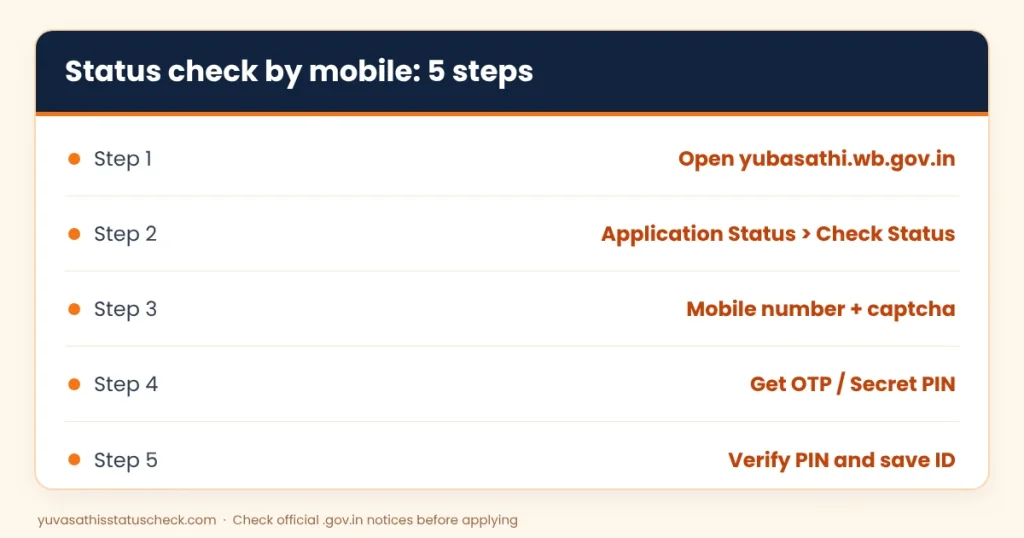
Quick answer: Open yubasathi.wb.gov.in, choose Application Status and then Check Status, enter your registered Yuva Sathi mobile number and the captcha, tap Get OTP / Secret PIN, then enter the 6-digit code and tap Verify PIN. Your application ID and status will appear on screen.
Also read: how to find your Yuva Sathi application ID and Yuva Sathi helpline number.
Yuva Sathi status check by mobile number: 5 easy steps
Before you start, keep the phone with your registered SIM next to you. The OTP is sent only to the Yuva Sathi mobile number written in your application, not to any other number.
- Open the official portal. Type yubasathi.wb.gov.in in your browser. Note the spelling “yuba” with a b. Typing it yourself is safer than tapping a link from WhatsApp.
- Go to the status option. On the home page, choose Application Status and then Check Status. The Applicant Login page opens.
- Enter your mobile number and captcha. Type the 10-digit number you used in the form, without +91 or 0, and solve the small captcha.
- Get and enter the OTP. Tap Get OTP / Secret PIN. A 6-digit code arrives by SMS. Enter it and tap Verify PIN.
- Read and save your status. Your application ID and current status appear. Take a screenshot and note the application ID on paper.
That is the complete Yuva Sathi status check by mobile number. If all five steps work, you are done. If something fails, use the problem-solving sections below.
What you need before you start
Most failed attempts at a Yuva Sathi status check by mobile number happen because one small thing is missing. Check this short list first.
- The exact Yuva Sathi mobile number. Use the number written on your Yuva Sathi form, even if you now use another number for daily calls.
- A SIM that can receive SMS. Some SIMs stop receiving messages when the plan runs out. A small recharge usually fixes it.
- Space in your SMS inbox. On older phones a full inbox can block new messages.
- Mobile data or Wi-Fi. The portal is slow on weak 2G signal.
- Your application slip, if you have it. It is not required for the mobile method, but it helps if you need office support.
Yuva Sathi mobile number problems and their fixes
This is the part most guides skip. Below are the real problems people face with the Yuva Sathi mobile number, and what usually works.
| Problem | Most likely reason | What to do |
|---|---|---|
| OTP not received | Weak signal, full inbox, DND, or heavy portal traffic | Wait 2 minutes, restart the phone, try again early morning |
| “No record found” | Different number was used in the form, or camp form not yet entered | Try other numbers in your family; ask the BDO office |
| SIM lost or closed | Number no longer active | Get a duplicate SIM for the same number from your operator |
| Wrong number written at camp | One digit typed wrongly by data entry | Visit BDO or municipality office with Aadhaar and slip |
| Captcha keeps failing | Typing error or expired page | Reload the page and type the new captcha |
| Page does not open | Status service paused or server busy | Try again later; check our news page for downtime |
OTP not received: 7 quick checks
- Make sure you typed the 10-digit number correctly, with no space or 0 in front.
- Check that the SIM in slot 1 is the registered one. Some phones read SMS only from one slot.
- Turn airplane mode on and off once to refresh the network.
- Delete old messages if your inbox is full.
- Wait at least two minutes before asking for a new OTP. Asking many times quickly can block requests for a while.
- Try at a quieter time, such as early morning or late night, when fewer people use the portal.
- If DND is active, the government sender is still allowed, but restarting the phone often helps the message come through.
Your SIM has changed
If you applied with a number that is now closed, the Yuva Sathi status check by mobile number will not work for you, because the OTP has nowhere to go. You have two options.
- Get a duplicate SIM. If the number was in your name, the mobile operator can issue a new SIM for the same number with your Aadhaar. This is the easiest fix.
- Visit the office. If the number cannot be restored, go to your BDO office (rural) or municipality or borough office (urban) with your Aadhaar card and any slip. Staff can search your record in other ways.
As far as we know, there is no online option to change the registered Yuva Sathi mobile number yourself. Be careful with any website that offers a “mobile number update” service, because it is not part of the official portal.
“No record found” for your number
This message scares many people, but it does not always mean your form was lost. These are the common reasons.
- Another number was used. At camps, many people gave a parent’s or sibling’s number. Try each number your family used in February 2026.
- Camp forms were entered later. Paper forms were typed into the system by operators, so some records appeared online weeks later.
- A digit was typed wrongly. One wrong digit sends your record to a different number.
- You applied for another scheme by mistake. The same camps took forms for other schemes too. Check what is printed on your slip.
Yuva Sathi status check by registration number
Some applicants have an application or registration number printed on their acknowledgement slip. Many people search for a Yuva Sathi status check by registration number because they lost access to their phone. A Yuva Sathi status check by registration number can still help you, but mostly at the office counter.
On the official portal, the applicant login is based on the mobile number and OTP. Some guides also mention an application reference ID option, but the mobile number is the main key and the OTP is always needed to see your record online. So if your number is not working, the registration number is most useful at the office counter.
Here is how to use your registration number correctly:
- Keep a clear photo of the slip on your phone and a paper copy at home.
- Take the slip and your Aadhaar card to the BDO, SDO or municipality office.
- Ask the staff to search by your registration number, name and date of birth.
- Ask them to note the correct mobile number on your record if it was wrong.
Never type your registration number together with your Aadhaar number and bank details on a private website that claims to show your status. Such sites cannot see government data.
What your status means after you log in
Once you finish the Yuva Sathi status check by mobile number, you will see a short status line. The wording can change slightly, but these are the common ones.
| Status | Meaning in simple words |
|---|---|
| Submitted / Received | Your form reached the department |
| Data uploaded | Your camp form has been entered online |
| Under verification / Pending | Officials are checking your papers |
| Approved / Sanctioned | You have been cleared for payment |
| Payment initiated | Money has been sent to your bank |
| Rejected | A rule was not met or a paper did not match |
For a detailed explanation of each stage and what to do next, read our main Yuva Sathi status check guide. If your status says approved but no money has come, see the Yuva Sathi payment status page.
How to check status for a family member
Many young people check their status on a parent’s phone, and many parents check for their children. This is fine, as long as you follow two simple rules.
- The OTP must come to the registered number. You can use any phone or computer to open the portal, but the SMS will only reach the number in the form.
- Do not share the OTP with strangers. A family member at home is fine. A caller who says he is “from Yuva Sathi office” is not.
If you are helping several people, finish one login fully before starting the next. Mixing two OTPs is a common reason for “invalid PIN” errors.
Yuva Sathi status check by mobile number on phone vs computer
You can do the Yuva Sathi status check by mobile number on a smartphone or on a computer. Both open the same official page, but each has small tricks.
| Point | On a smartphone | On a computer |
|---|---|---|
| Opening the portal | Use Chrome or any updated browser | Any browser works |
| Reading the OTP | SMS arrives on the same phone, easy to copy | Keep the registered phone next to you |
| Captcha | Zoom in if it is small | Usually easier to read |
| Saving the result | Take a screenshot | Use Print to PDF or a screenshot |
| Best for | Quick checks at home | Helping several family members |
If the page looks broken on your phone, turn on “Desktop site” in the browser menu. This often fixes buttons that do not respond.
6 common mistakes during a Yuva Sathi status check by mobile number
These small mistakes cause most failed logins. Avoid them and your Yuva Sathi status check by mobile number should work on the first try.
- Typing +91 or 0 before the number. Enter only the 10 digits.
- Using your new number. The portal knows only the Yuva Sathi mobile number written in the form.
- Requesting the OTP again and again. Each new request cancels the old code. Use only the latest one.
- Waiting too long. OTPs expire after a short time. Enter the code soon after it arrives.
- Opening a lookalike site. Check that the address is exactly yubasathi.wb.gov.in before you type anything.
- Not saving the application ID. Write it down the first time you see it, because it helps at the office later.
Checking from a cyber cafe or common service centre
You can do the Yuva Sathi status check by mobile number from a cyber cafe, but you do not have to pay anyone for it. The check is free. If you go to a cafe for help:
- Carry the phone with the registered SIM so you receive the OTP yourself.
- Watch the screen and make sure the address is yubasathi.wb.gov.in.
- Do not let the operator save screenshots of your details on their computer.
- Log out when you finish and close the browser.
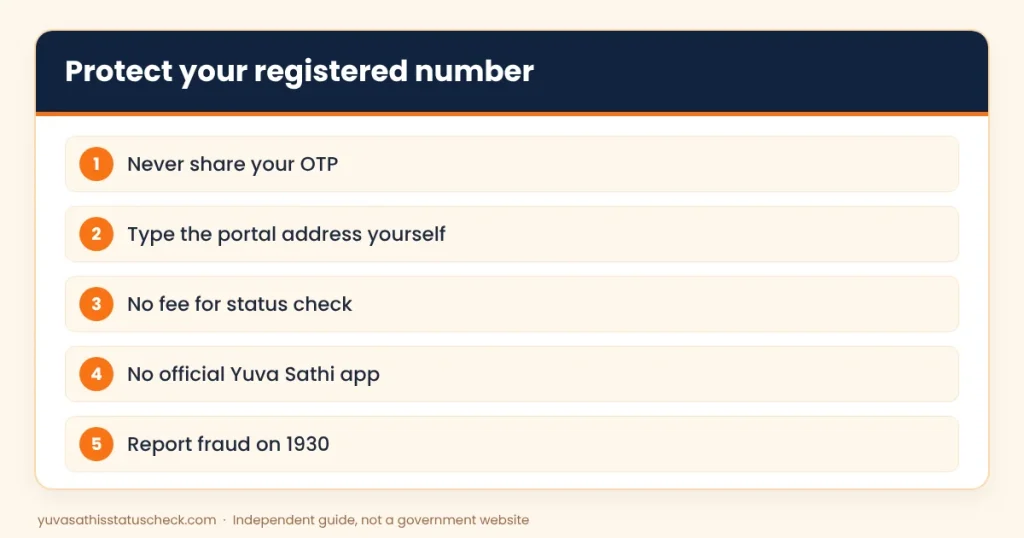
Safety tips: protect your Yuva Sathi mobile number
Your Yuva Sathi mobile number is the key to your record, so treat it like a bank PIN.
- Never share the OTP or secret PIN with anyone on a call.
- No government officer will ask for an OTP, an ATM PIN or money to “release” your payment.
- Do not install apps that claim to show Yuva Sathi status. The state has not released such an app.
- If you are cheated, call your bank at once and report it on 1930 or at cybercrime.gov.in.
When the portal itself is down
Sometimes the problem is not your phone at all. After the application window closed on 26 February 2026, the status option was reported as unavailable for several weeks. During busy days, the page can also be very slow.
If the status page does not open:
- Try again after a few hours, or early the next morning.
- Clear your browser cache or try another browser.
- Check our Yuva Sathi news page, where we note when the portal is down.
- If it stays down for days, your block or municipality office can still tell you your status.
What to do after your Yuva Sathi status check
Seeing your status is only useful if you act on it. Here is a simple plan based on what you found.
- Approved or payment initiated: Check your bank SMS or passbook. Make sure your account is active and Aadhaar-seeded for DBT.
- Pending or under verification: Wait, and answer any call from the block or municipality office. Repeat the Yuva Sathi status check by mobile number once a week, not every hour.
- Rejected: Ask the office for the reason in writing. Note it down, because the same rule may matter for the new Yuva Shakti form.
- No record found: Try every family number, then visit the office with your slip.
Whatever your result, keep your Yuva Sathi mobile number active. It is the only key to your online record, and losing it makes every future check much harder.
Yuva Sathi and the new Yuva Shakti scheme
The Yuva Sathi status check by mobile number only shows records from the old Banglar Yuva Sathi scheme, which took applications from 15 to 26 February 2026. The new Yuva Shakti scheme, announced in the June 2026 budget, has not opened applications yet, so there is no Yuva Shakti status to check.
When Yuva Shakti opens, the login is expected to work in a similar way, with a mobile number and OTP. That is one more reason to keep your number active. Read our Yuva Shakti online apply page for the latest on the new form.
Frequently asked questions
How can I do a Yuva Sathi status check by mobile number?
Open yubasathi.wb.gov.in, choose Application Status and then Check Status, enter your registered number and the captcha, get the OTP, enter it and tap Verify PIN.
Why am I not getting the Yuva Sathi OTP?
Common reasons are weak signal, a full SMS inbox, the wrong SIM slot or heavy traffic on the portal. Wait two minutes, restart the phone and try again at a quieter time.
Can I check Yuva Sathi status without a mobile number?
Not online. The portal needs the registered number for the OTP. Without it, visit your BDO or municipality office with your Aadhaar card and slip.
Can I do a Yuva Sathi status check by registration number?
The registration number is most useful at the office counter. Online, the mobile number and OTP are the main way to log in.
How do I change my Yuva Sathi mobile number?
We have not found an online option to change it. If the old number was yours, get a duplicate SIM. Otherwise, ask the BDO or municipality office for help.
My status says no record found. Is my application rejected?
Not necessarily. You may have used a different number, or your camp form may not have been entered online yet. Try other family numbers and then ask the office.
Is there any fee for the status check?
No. The Yuva Sathi status check by mobile number is free on the official portal.
Can I check Yuva Shakti status with my Yuva Sathi number?
No. Yuva Shakti applications have not started yet, so there is no Yuva Shakti status to show.
Sources we checked
- Banglar Yuva Sathi official portal: applicant login and mobile number requirement.
- Banglar Yuba Sathi notification, No. 102/YS, 13 February 2026: scheme rules, sanctioning offices and contact email.
- Careers360 (PTI), 15 February 2026: camps from 15 to 26 February in all 294 constituencies.
This is an independent guide, not a government website. We never ask for your OTP, Aadhaar number or bank details.
3 Comments